C# BindingSource 类
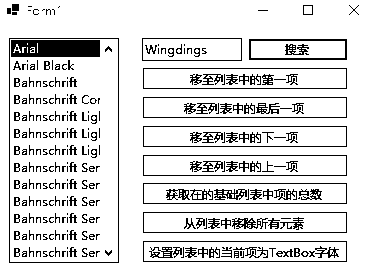
using System.ComponentModel;

namespace BindingSourceExamples
{
    public partial class Form1 : Form
    {
        public Form1()
        {
            InitializeComponent();
        }

        private void Form1_Load(object sender, EventArgs e)
        {
            binding1 = [];
            // 创建字体列表并添加系统中可用的常规样式字体
            MyFontList fonts = [];
            for (int i = 0; i < FontFamily.Families.Length; i++)
            {
                // 检查字体是否支持常规样式
                if (FontFamily.Families[i].IsStyleAvailable(FontStyle.Regular))
                {
                    // 添加符合条件的字体到列表
                    fonts.Add(new Font(FontFamily.Families[i], 11.0F, FontStyle.Regular));
                }
            }
            // 设置数据绑定
            binding1.DataSource = fonts;       // 将数据源设置为字体列表
            listBox1.DataSource = binding1;    // 将列表框绑定到BindingSource
            listBox1.DisplayMember = "Name";   // 列表框中显示字体的Name属性
        }

        //搜索
        private void button1_Click(object sender, EventArgs e)
        {
            // 检查数据源是否支持搜索
            if (!binding1.SupportsSearching)
            {
                _ = MessageBox.Show("无法搜索列表。");
            }
            else
            {
                // 在数据源中搜索指定名称的字体
                int foundIndex = binding1.Find("Name", textBox1.Text);

                // 根据搜索结果处理
                if (foundIndex > -1)
                {
                    listBox1.SelectedIndex = foundIndex; // 选中找到的项
                }
                else
                {
                    _ = MessageBox.Show("未找到该字体。");
                }
            }
        }

        //移至列表中的第一项。
        private void button2_Click(object sender, EventArgs e)
        {
            binding1.MoveFirst();
        }

        //获取在的基础列表中项的总数
        private void button3_Click(object sender, EventArgs e)
        {
            MessageBox.Show($"共:{binding1.Count.ToString()}种字体");

        }

        private void textBox1_TextChanged(object sender, EventArgs e)
        {

        }

        //从列表中移除所有元素。
        private void button4_Click(object sender, EventArgs e)
        {
            binding1.Clear();
        }

        //设置列表中的当前项为TextBox字体
        private void button5_Click(object sender, EventArgs e)
        {
            MessageBox.Show($"当前:{(Font)binding1.Current}种字体");
            textBox1.Font = (Font)binding1.Current;

        }

        //移至列表中的最后一项
        private void button6_Click(object sender, EventArgs e)
        {
            binding1.MoveLast();
        }

        //移至列表中的下一项
        private void button7_Click(object sender, EventArgs e)
        {
            binding1.MoveNext();
        }

        //移至列表中的上一项
        private void button8_Click(object sender, EventArgs e)
        {
            binding1.MovePrevious();
        }
    }

    // 自定义字体列表,继承自BindingList<Font>以支持数据绑定
    public class MyFontList : BindingList<Font>
    {
        // 重写属性,指示此列表支持搜索
        protected override bool SupportsSearchingCore => true;

        // 重写搜索核心方法,实现自定义搜索逻辑
        protected override int FindCore(PropertyDescriptor prop, object key)
        {
            // 忽略属性值,按字体家族名称搜索
            for (int i = 0; i < Count; ++i)
            {
                // 不区分大小写比较字体名称和搜索关键字
                if (Items[i].FontFamily.Name.Equals((string)key, StringComparison.CurrentCultureIgnoreCase))
                {
                    return i; // 找到匹配项,返回索引
                }
            }
            return -1; // 未找到匹配项,返回-1
        }
    }
}
文章目录
文章作者:hujiato
文章标题:C# BindingSource 类
文章链接:https://www.xbaoku.top/?post=17
本站所有文章除特别声明外,均采用 CC BY-NC-SA 4.0 许可协议,转载请注明来自hujiato !
文章标题:C# BindingSource 类
文章链接:https://www.xbaoku.top/?post=17
本站所有文章除特别声明外,均采用 CC BY-NC-SA 4.0 许可协议,转载请注明来自hujiato !
设备上扫码阅读